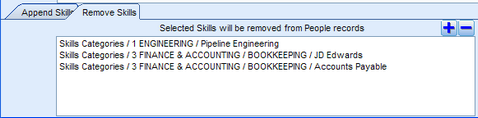
In order to batch delete un-needed skills on a list of People, there is a feature in the People List view called: Make Batch Changes fro People in List
To Delete Multiple Skills from A People List:
•Create a list of People who have unwanted Skills
•Click the Make Batch Changes icon in the right margin
•The Make Batch Changes utility is displayed
•Click the sub-tab called Remove Skills
•Click the Select Skills icon
•Select the Skills that must be removed from People in the list
•Click Apply button
Example: Batch Delete Skills from List of People